


-
Latest Post
Showing posts with label UTILITY. Show all posts
Showing posts with label UTILITY. Show all posts
DOWNLOAD CPU-Z V1.71.1 FREE : GOOGLE DRIVE DOWNLOAD LINK
CPU-Z v1.71.1 is an application that we can use to find out all the information about the computer or laptop. All the information on the hardware that was installed on our computer can be displayed with complete and accurate by the software CPU-Z v1.71.1
CPU
- Name and number.
- Core stepping and process.
- Package.
- Core voltage.
- Internal and external clocks, clock multiplier.
- Supported instructions sets.
- All cache levels (location, size, speed, technology).
Mainboard
- Vendor, model and revision.
- BIOS model and date.
- Chipset (northbridge and southbridge) and sensor.
- Graphic interface.
Memory
- Frequency and timings.
- Module(s) specification using SPD (Serial Presence Detect) : vendor, serial number, timings table.
System
- Windows and DirectX version.
Download CPU-Z Freeware From Google Drive
File Name : CPU-Z v1.71.1 Free
File Size : 1,5 Mb
OS Support : Windows 2000/XP/2003/Vista/7/8
TeamViewer 10.0 Beta

TeamViewer is the fast, simple and friendly solution for remote access over the Internet - all applications in one single, very affordable module.
Remote control of computers over the Internet, Instantly take control over a computer anywhere on the Internet, even through firewalls. No installation required, just use it fast and secure. Training, sales and teamwork, TeamViewer can also be used to present your desktop to a partner on the Internet. Show and share your software, PowerPoint presentations etc. File transfer, chat and more, Share your files, chat, switch the direction during a teamwork session, and a lot more is included in TeamViewer.
What's new in this version:
- TeamViewer 10 includes significant performance optimizations. CPU usage optimizations for multi-core processors, HD voice transmission quality, and faster login and load times for the Management Console are just a few examples.
- Apply setting policies, distribute them, and enforce them if necessary, all via the Management Console. Any changes to setting policies are automatically applied to all installations. IT Admins will be happy to know that importing .reg files is now a thing of the past.
- Permit access to all your devices using just one whitelist. No longer worry about having to grant users access via the whitelist on each specific device. Also reduce administrative work now by adding companies to the whitelist instead of having to manage access rights for individual users.
- Refer back to a previous discussion to find information or help resolve an issue. TeamViewer 10 provides a complete chat history for all conversations, and chats are end-to-end encrypted. Create persistent chat groups for ongoing discussions as well.
- Reach out to your colleagues using video and VoIP in exceptional quality for both image and audio without having to first start a meeting. See and talk to multiple participants simultaneously in a single call, and share your screen at any time. As always, security is paramount to TeamViewer, so video calls are end-to-end encrypted just as regular screen sharing meetings are.
- Put a face to your name and a personal touch to your online presence. Your profile picture is displayed in the Computers & Contacts list, chat window, request dialogs, and similar locations where it helps to identify you and add to your professional image.
- Quickly find the right person or device with whom or which to share your screen or files. TeamViewer 10 now automatically displays nearby computers and contacts.
- Ultra high definition monitors, also known as 4K displays, are becoming increasingly popular because of their incredible image fidelity. By means of intelligent scaling, TeamViewer 10 provides flawless connections to 4K displays for both remote control and meeting sessions.
- Customizations are now applied to the download site for the custom modules as well as the waiting room for meetings and service cases. This gives your corporate identity a more prominent presence.
- Maintain a protocol during a remote control session, or note something when it comes to mind. There is no need to wait until the end of a session to write comments.
- Modern software should look the part. TeamViewer 10 boasts a streamlined design and convenient new shortcuts to commonly used features and options. TeamViewer’s already intuitive interface is now even easier to use.
- Integrate your computers and contacts into any software by taking advantage of the Computers & Contacts API. See, for example, when your customers are online, and establish a connection to them from within your software. Synchronize information, and easily access, manage, and edit your computers and contacts.
- With user-definable session timeout limits, supporters and their clients never have to worry about idle sessions remaining open.
- Set up spontaneous support in addition to unattended access. Users can request spontaneous support that automatically generates a service case. There is no need to run a different module.
- Integration with Dropbox, Google Drive, and more
- Share files during meetings or remote control sessions by using Dropbox, Google Drive, OneDrive, or Box. Have your files available to share from wherever you are. With your data already in the cloud, you save both time and bandwidth.
- Do some final prep work before unlocking the door, or encourage participants to be on time by locking the door after starting a meeting. Don’t worry though, you can always see who is waiting outside and invite them to join.
- The whiteboard is now available during remote control. After all, a picture really can be worth a thousand words when trying to explain something. Both sides of the connection are able to use the whiteboard simultaneously as well.
- BlackBerry App (Preview) The TeamViewer app for Remote Control is now available for BlackBerry: BlackBerry World
- Control computers remotely as if you were sitting right in front of them.
- Transfer files in both directions.
- Enjoy the highest security standards: 256 Bit AES Session Encoding, 2048 Bit RSA Key Exchange.
Additional features for Mac
- Benefit from a seamlessly integrated remote control toolbar specifically designed for Mac OS X Yosemite.
- Customize your QuickJoin and Host modules
- Use a full-featured whiteboard, even during remote control sessions
- Select only what you want to reveal on your screen during meetings by using a highly intuitive application selection feature
Additional features for Linux
- Use Linux computers to provide mobile device support to the ever increasing number of mobile devices under your care.
Download: TeamViewer 10.0 Beta | 8.5 MB (Free for personal use)
How to uplaod file to Google Drive
When you need to download a zipped file from Google drive, you might have seen the heaps of files and confused how to download. In such case, there is option to download the file clicking on File-Download option.

1. Login to Google Drive using your Gmail ID
2. Create a Folder


Name the Folder. It can be any name. Here, I name it "Software".
3. Share it


I have made the Folder 'Public on Web'. Whatever files are stored inside this folder are shared to all.
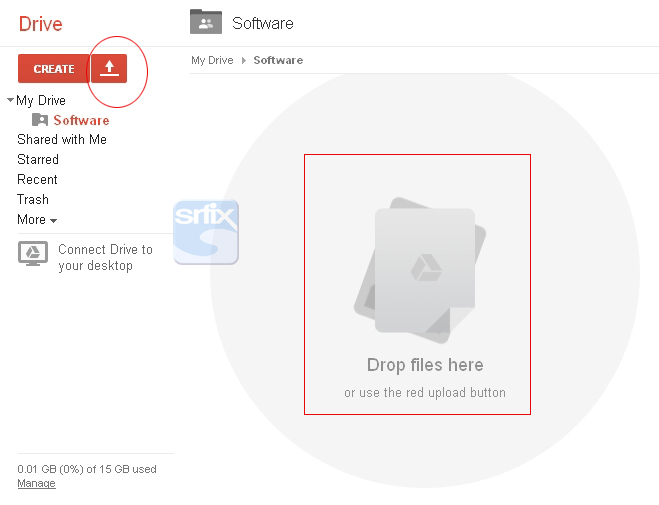
4. Upload zipped file.
To upload the file click the Arrow button or Drag and drop the file to the area shown.


 Check Mysoftware.zip, select Details and activity from More menu.

5. Select Details.
Come down to Hosting:
Copy the link available.
In Blog or Site, provide the hosting link to Download. When the user clicks Download, the file will be downloaded directly to Download location.
 -srputtur
DTC,Puttur
This happens due to procedure adapted in uploading file or you are given the shared link instead of hosted link. The following method will provide you hosted link when you are uploading a file and make the download process easy.
1. Login to Google Drive using your Gmail ID
2. Create a Folder
Name the Folder. It can be any name. Here, I name it "Software".
3. Share it
I have made the Folder 'Public on Web'. Whatever files are stored inside this folder are shared to all.
4. Upload zipped file.
To upload the file click the Arrow button or Drag and drop the file to the area shown.
I have uploaded "Mysoftware.zip" file to the 'Software' Folder.
5. Select Details.
Come down to Hosting:
Copy the link available.
In Blog or Site, provide the hosting link to Download. When the user clicks Download, the file will be downloaded directly to Download location.
DTC,Puttur
Tuesday, January 21, 2014
PoT Intimation v5.0 for VPL/VPP/BPCOD/EPCOD Intimation Slip

Features
- VPL,VPP, BPCOD and EPCOD included.
- Two types of Printer Format option added.
- Check for Update option included.
- Taskbar icon added for Minimize restore and Check for Update.
- EPP were removed.
Download
Installer
How to Use ?
- Download PoT Intimation v 5.0 from PoTools.
- Install Downloaded setup file at once.
- Configure Server Name and SA Password then select Print format and then click ok.
- Open PoT Intimation from your Desktop Shortcut for use.
- via:- http://srfix.blogspot.in
List of Best and free Software, Utility and Tool for System Administrators

As a professional System Administrator your job becomes easy with the
below listed tools, whether you are dealing with issues related to Desktop,
Server or Network you will find something related for you which could
be used in daily troubleshooting task
Process explorer
Process monitoring tool for windows operating systems, unlike
task manager it provides vast amount of information for running
process and detailed information on DLLs, threads, handles and TCP/IP
connections. It is a advanced process management utility and replacement for
task manager
Belarc Advisor
A 3402 Kilo Bytes file size of free tool to do your
system inventory . The software builds a in-depth profile of
installed hardware and software, network, Installed hotfixes, status of
anti-virus , you can use your Web browser to view the details.
·
Works with Operating systems: Server (Both 32
and 64 bit) : Windows server 2012, 2008, 2003 Windows 8, Windows 7, windows
2008 R2, Windows Vista, Windows server 2008, Window server
2003, XP, 2000, NT 4, Me, 98, and 95. Both 32-bit and 64-bit Windows are
supported.
·
Works with browser Versions : Internet Explorer,
Firefox, Safari, Opera, and others.
Tool is used to uninstall Norton AntiVirus,
Norton Internet Security, Norton 360, and Norton
SystemWorks 12.0 from your computer. If you use ACT! or
WinFAX, back up those databases before you proceed.
Link: http://support.norton.com/sp/en/in/home/current/solutions/kb20080710133834EN_EndUserProfile_en_us/
MyDefrag-4.0
Completely automated and easy to use, quick, low
overhead, with several optimization strategies, and also works for floppies,
USB disks, memory sticks, and anything else that looks like a disk to Windows.
It is a simple tool which can defragment and optimize the windows
2000/2003/XP/Vista/2008/X64.
Comes with different versions as below
·
JkDefrag.exe - Windows Version
·
JkDefragCmd.exe - Commandline version
·
JkDefragScreenSaver.scr + JkDefragScreenSaver.exe -Screen saver
version.
Link: kessels.com
PING [Partimage Is Not Ghost ]
PING [Partimage Is Not Ghost ]
Best tool for Linux system rescue and windows with
the below features
·
Backup and restores Locally or network files and
partition
·
Can be used to backup Bios and restoration bootable
DVD
·
Backup MS Network Shared directory, NFS, FTP or
SSHFS
·
Creates bootable DVD
·
Partitions and Format a disk for installing
Windows
Link: http://ping.windowsdream.com
SuperScan
SuperScan
A vigorous utility known as SuperScan is a
TCP port scanner, which also includes list of other additional networking tools
like ping, traceroute, HTTP HEAD, WHOIS and many more. Can be used to perform
ping scans and port scans for any IP range or specify a text file to extract
addresses from. Other features include TCP SYN scanning, UDP scanning, HTML
reports, built-in port description database,
Windows host enumeration, banner grabbing and more.
Download link: http://www.snapfiles.com/get/superscan.html
Windows Sysinternals
Provides a list utilities useful to troubleshoot, manage, and diagnose your Windows systems and applications.
Links : http://technet.microsoft.com/en-us/sysinternals/default.aspx
VirtualBox
Windows Sysinternals
Provides a list utilities useful to troubleshoot, manage, and diagnose your Windows systems and applications.
Links : http://technet.microsoft.com/en-us/sysinternals/default.aspx
VirtualBox
Free Open source server, desktop virtualulization
utility from Oracle
·
List of Supported host operating systems : Linux,
Mac OS X, Windows XP, Windows Vista, Windows 7, Windows 8, Solaris, and
OpenSolaris; there is also a port to FreeBSD.[3]
·
List Supported guest operating systems :
versions and derivations of Windows, Linux, BSD, OS/2, Solaris and
others. The release 3.2.0, VirtualBox allows to virtualize Mac OS X
guests on Apple hardware, OSX86 can also be installed .
Download Link: virtualbox
Everything from Voidtools
Everything from Voidtools
It is a simple, easy to use and free utility .
Shows faster and better search results as compared to the built in
Windows search. An administrative tool to locates files and folders by
filename for Windows. It is a Freeware
Works with Operating System : Windows 2000, XP, 2003 and Vista and Windows
7
Drawbacks of using : Only search local Files and folders and
Removale NTFS volumes. To search for Netwok drive you need to install it on
both local and network
computers and start ETP server, does not search
contents it only works for files and folders names
Link : http://www.voidtools.com
WinDirStat and KDirStat
WinDirStat is
a disk monitoring and
clean up utility for Windows operating systems. On loading it takes a while to
read the complete directory tree once and then presents it in three useful
views:
The directory list sorts like Windows Explorer but it is sorted by
file/subtree size
The treemap displays complete contents of the directory tree
The extension list, Display statistics about the file types.
KDirStat is a GUI () disk usage utility for Linux, BSD, and other
Unix-type systems like Solaris. it provides cleanup facilities to reclaim disk
space.
Download Link: http://windirstat.info/
Download Link: http://kdirstat.sourceforge.net/
Wireshark
A very popular, free and open source tool used for Network troubleshooting It capture the packets from Network traffic which is helpful in troubleshooting purpose i network related issues. Network Administrator's read the live packet capture or can also save the capture.
Compatible with Linux, OS X, BSD, and Solaris and Microsoft Windows.
Link: http://www.wireshark.org/
UltraTech Knowledgebase Viewer
UltraTech Knowledge base viewer provides list of tools and their links. It has list of KB CONTENTS, not well updated but good for the beginner who are looking for good technical links
Link: http://kb.ultratech-llc.com
A very popular, free and open source tool used for Network troubleshooting It capture the packets from Network traffic which is helpful in troubleshooting purpose i network related issues. Network Administrator's read the live packet capture or can also save the capture.
Compatible with Linux, OS X, BSD, and Solaris and Microsoft Windows.
Link: http://www.wireshark.org/
UltraTech Knowledgebase Viewer
UltraTech Knowledge base viewer provides list of tools and their links. It has list of KB CONTENTS, not well updated but good for the beginner who are looking for good technical links
Link: http://kb.ultratech-llc.com
Courtesy
: http://www.systemadminthings.com/
DB TOOLS

DB Tools - Features
1. To Clear the Log files single / All the Database
2. To shrink the Databases and increase the HDD free space
3. Repair the Access ( MDB ) and Foxpro (DBF) databases
4. To Take SQL Database backup from Any Where & Any Time
5. To ckeck and Correct some internal problem in SQL DatabaseDatabase Tools : Download Updated on 30/08/2009
Supporting DLL and OCX Files : Download
Courtesy:-http://mrsupport.blogspot.in
All In One Tool For System Checkup, System Cleanup, System Speedup, Network Security And PC Performance

Latest Version: 1.0.0.230
Operating System:Windows XP/2003/Vista/Server 2008/7
Category:Diagnostic SoftwareOperating System:Windows XP/2003/Vista/Server 2008/7
File Size: 3.9 M
- The Disk Cleaner tool will clean out all junk files.
- The Registry Cleaner tool will make the PC system more stable by cleaning out the bad Registry entries.
- The Registry Defrager rebuilds PC’s Registry, making the entire system run quicker and smoother.
- The History Cleaner protects the user’s privacy by deleting all activity history and surfing traces.
- The Fast Defrger will de-fragment the hard drive with it’s smart engine, keep the PC running efficiently and prevent the formation of other fragmented files.
- The Checkup module provides a full report of user’s PC system and allows the user to fix all problems with one simple click.
- The Boot Report provides a easy to read report that shows the start-up time of user’s system. It offers a detailed list of the processes loaded since booting.
- The Startup Optimizer allows the user to disable or delay the loading of any startup entries. It also provides the users with suggestions of standard processes.
- The Game Booster concentrates every system resource for gaming purpose. It temporarily shuts background processes and other unnecessary Windows services. The Game Booster also cleans out the RAM and intensifies processor performance.
- The Password Generator creates highly secure passwords with upper and lower case letters, numbers and punctuation symbols.
- The File Undelete data recovery software ensures recovery of data permanently deleted from the Recycle Bin or with the help of SHIFT + DELETE key.
Courtesy:-http://mrsupport.blogspot.in